Payers running QNXT, Facets, HealthEdge, or another core administration processing system (CAPS) all face the same practical question: how do you implement modern FHIR interoperability and prior authorization when decades of membership, benefits, provider, authorization, and claims processing already live in existing systems?
You do not have to choose between "do nothing" and "replace everything." There are three architectural options in front of most health plans:
- Force the legacy core to implement every new interoperability capability — extending a CAPS platform that was never designed around FHIR, on the vendor's roadmap and timeline.
- Replace the core entirely — a multi-year, high-risk transformation program before any compliance value is realized.
- Deploy Cloud Health Office alongside the existing core and progressively move capabilities into it when—and only when—it makes operational sense.
Cloud Health Office is built for the third path, and it is deliberately not a one-way door. The same platform supports modernization around an existing core and operating as the payer core backend itself. A plan can start with Cloud Health Office as a thin FHIR boundary in front of QNXT, Facets, or HealthEdge, and—behind a stable external FHIR contract—grow it into the system of record for one domain, several domains, or eventually the whole core.
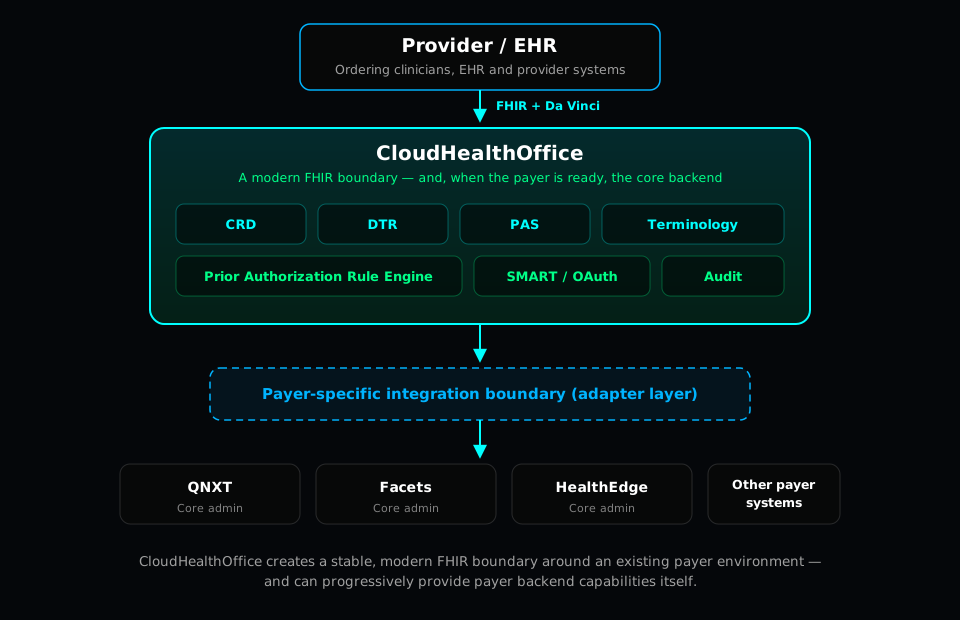
01The CMS-0057-F interoperability boundary
CMS-0057-F—the Advancing Interoperability and Improving Prior Authorization Processes final rule—requires impacted payers (Medicare Advantage organizations, state Medicaid and CHIP programs, and Qualified Health Plan issuers on the Marketplaces) to implement a set of modern, standardized FHIR R4 interoperability APIs. Among these is an expanded Prior Authorization API that surfaces prior-authorization requirements, documentation, and decisions through FHIR.
CRD, DTR, and PAS are not individually named as mandates in the current final rule. They are the HL7 Da Vinci implementation approaches most commonly recommended to satisfy the required Prior Authorization API capabilities. Cloud Health Office implements CRD, DTR, and PAS as a coherent way to meet those capabilities—but implementing them is an implementation strategy, not a certification.
Cloud Health Office makes no claim of regulatory certification. Installing Cloud Health Office does not, by itself, make a payer CMS-0057-F compliant. Production compliance depends on payer configuration, identity, source systems, policies, data quality, operations, security controls, governance, and legal/compliance review.
What Cloud Health Office does provide is a concrete, implemented technical surface: the FHIR R4 APIs and the Da Vinci CRD, DTR, and PAS workflows that a prior-authorization program is built on. The CMS-0057-F readiness overview covers the four required FHIR APIs and how a vendor-neutral readiness layer maps to them; this article focuses on the prior-authorization workflow and how it connects to QNXT, Facets, and HealthEdge.
02CRD — what does the payer require?
Coverage Requirements Discovery (CRD) answers a provider-facing question at the point of ordering: does this service require prior authorization, and what does the payer need? Cloud Health Office exposes CRD through CDS Hooks, so an ordering clinician's EHR can call it during the order workflow and get an answer back as a card—before the order is even signed.
The interaction turns on a set of payer questions: eligibility, plan, benefits, provider, procedure, diagnosis, place of service, policy, and the resulting authorization requirements. Cloud Health Office's CRD implementation is real, not hypothetical—it lives in src/services/fhir-service/Controllers/CrdController.cs and src/services/fhir-service/Services/CrdService.cs. Concretely, Cloud Health Office CRD:
- Exposes CDS Hooks discovery at a publicly reachable discovery endpoint, advertising its available services.
- Supports
order-select— early guidance as a service is chosen. - Supports
order-sign— a final prior-authorization determination at order signing. - Extracts codes from draft orders in the hook request (for example,
ServiceRequestandMedicationRequestresources). - Invokes terminology translation where appropriate—calling the Cloud Health Office Terminology Service to normalize codes before evaluation.
- Calls the Cloud Health Office Prior Authorization Rule Engine to evaluate the requested service.
- Evaluates payer-specific classifications and rules (auth-required, documentation-required, and auto-approved code sets) per tenant.
- Returns CDS cards describing authorization and documentation requirements—including a card that can launch DTR when documentation is needed.
03Terminology — the layer that makes it work
Terminology is central to this workflow, not a footnote. An EHR may send a diagnosis as SNOMED CT while the payer's medical policy and benefit configuration are expressed in ICD-10-CM, CPT, or HCPCS. Without translation, a correct clinical code and a correct policy rule simply never meet.
Cloud Health Office provides FHIR-native terminology capabilities and works across the code systems this workflow depends on:
- SNOMED CT for clinical findings and procedures from the EHR
- CPT and HCPCS for procedures and services
- ICD-10-CM for diagnoses
- LOINC where laboratory and observation codes are in play
- FHIR
CodeSystemandValueSetresources, plus payer-specific code groupings
The terminology architecture lives in src/services/CHO.TerminologyService/ and is documented in the Terminology Crosswalk guide. Its primary operation is the FHIR-standard ConceptMap/$translate (with a $batch-translate variant for translating many codes at once). Crucially, the CRD implementation actually calls this service: CrdService collects the SNOMED codes from the draft order and posts them to the Terminology Service for translation to ICD-10-CM before the Prior Authorization Rule Engine ever runs. If the Terminology Service is unavailable, CRD degrades gracefully and continues with the raw codes rather than failing the hook.
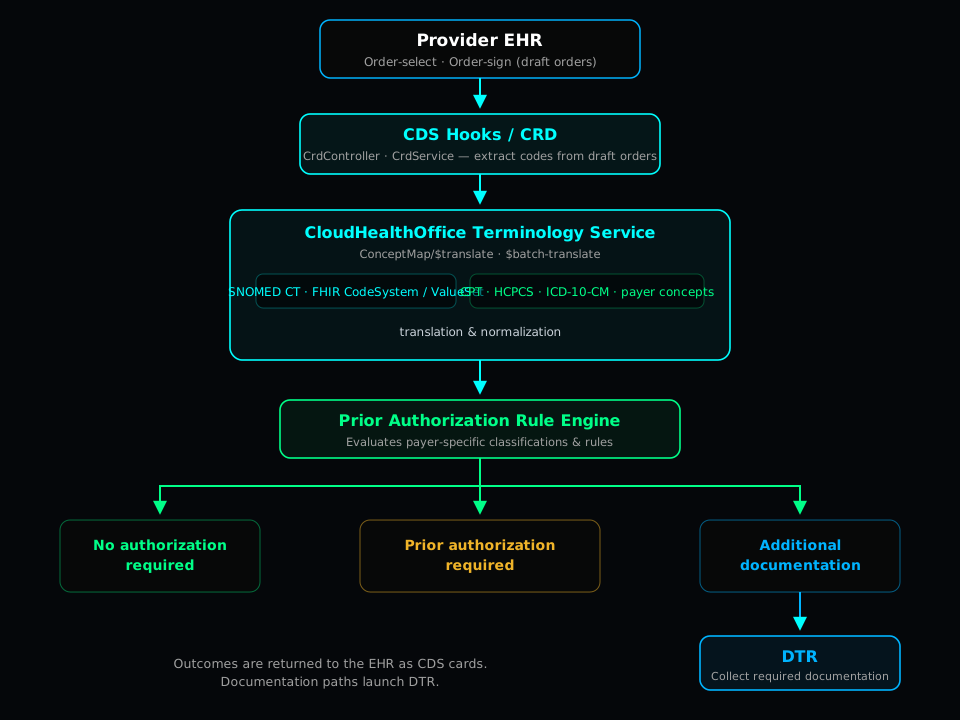
The essential path is short and worth stating plainly:
04DTR — what information does the provider need to supply?
When CRD determines that documentation is required, Documentation Templates & Rules (DTR) is how it gets collected. DTR answers a different question than CRD: not "is authorization required?" but "what exactly does the provider need to supply, and how do we gather it as structured data?"
Cloud Health Office's DTR implementation is in src/services/fhir-service/Controllers/DtrController.cs and supports the FHIR R4 building blocks DTR depends on:
Questionnaire
- GET by id
- Search
- Create
- Update
QuestionnaireResponse
- GET by id
- Search
- Submit completed / amended responses
Operations & context
$questionnaire-package- Tenant-aware workflows
- Patient context
The DTR engine is implemented, but a payer's DTR behavior is not turnkey out of the box. Payer-specific onboarding still determines the questionnaire content, the medical-policy content behind it, the prepopulation rules, the clinical governance that signs off on them, and the effective dates that decide which version applies when. Cloud Health Office provides the mechanism; the plan's policies provide the meaning.
05PAS — submit the authorization and receive the decision
Prior Authorization Support (PAS) is where the request becomes a decision. Cloud Health Office implements the Da Vinci PAS Claim/$submit operation in src/services/fhir-service/Controllers/PasController.cs, and it does real payer business processing rather than proxying FHIR into another platform. On submit, Cloud Health Office:
- Validates and extracts the PAS Claim from the request
Bundle. - Runs CMS-0057-F-oriented compliance checks on the request before adjudicating.
- Performs provider verification—for example, screening the requesting provider NPI against federal exclusion sources, and auto-denying an excluded provider.
- Runs prior-authorization decisioning to produce a result.
- Returns approved, denied, or pended outcomes as a PAS response bundle.
- Persists the authorization so decisions are tracked and available downstream.
- Records telemetry and metrics for each decision (outcome and firing rule), with a response-time target aligned to the PAS implementation guide.
The point worth emphasizing to an architecture team: Cloud Health Office is doing the payer business processing itself. The authorization decision, the provider screening, and the persistence are Cloud Health Office's, not a thin passthrough to a downstream UM system.
06How it fits together — and where it can go
Put CRD, DTR, and PAS on one line and the shape of the workflow appears: discover requirements, collect documentation, submit and decide. They are connected payer workflows, not three isolated APIs.
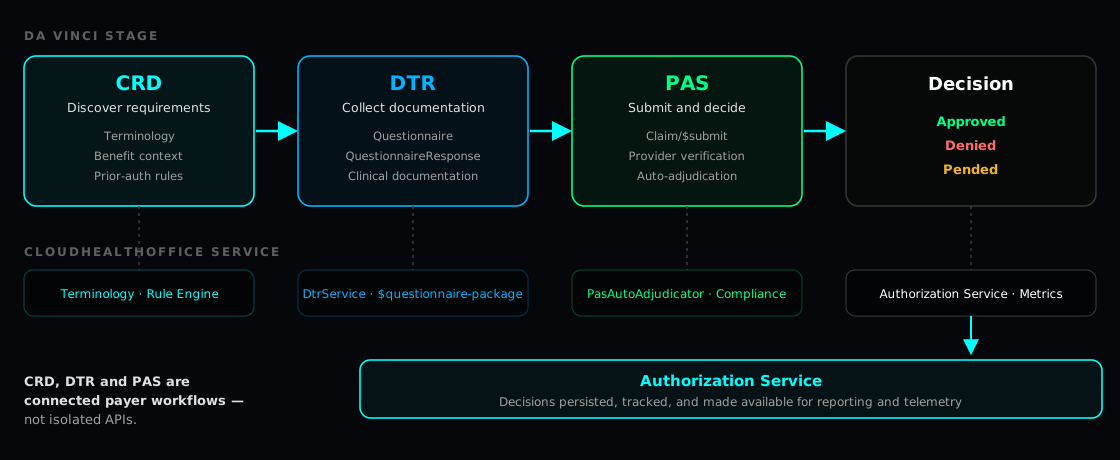
The same picture has two end states. In the first, Cloud Health Office sits in front of the existing core and hands off to a payer-specific adapter layer:
CRD · Terminology · Rule Engine · DTR · PAS · Authorization · SMART/OAuth · Provider Verification · Audit
In the second, Cloud Health Office is the core backend—the same FHIR surface, now over Cloud Health Office's own membership, eligibility, benefits, provider, prior authorization, claims, accumulator, and payer administration services:
FHIR · Membership · Eligibility · Benefits · Providers · Prior Authorization · Claims · Accumulators · Payer Administration
The external FHIR contract is the same in both pictures. What changes underneath is how much of the payer backend Cloud Health Office owns.
07Why there is no universal QNXT, Facets, or HealthEdge adapter
It is tempting to advertise a single, preconfigured "QNXT adapter" or "Facets adapter." Cloud Health Office deliberately does not, because it would not be true. Two payers running the same CAPS product are rarely the same system. They can differ in:
- product versions and modules
- extensions and customizations
- available APIs and middleware
- data warehouses and reporting stores
- UM systems and provider systems
- which team operationally owns which domain
So the adapter is determined during onboarding, not assumed. The work is to establish, for each specific plan:
- the system of record for membership
- the system of record for benefits
- the provider source
- the authorization source
- the claims dependencies
- the interfaces actually available
- the synchronization requirements between systems
Only then is the appropriate adapter configured or implemented.
Cloud Health Office maintains a stable modern interoperability boundary while the payer-specific adapter connects to the organization's actual source systems. The FHIR contract facing providers stays constant; the adapter absorbs the reality of each plan's environment. QNXT, Facets, and HealthEdge adapters are payer-specific onboarding integrations—implementation work—not universal preconfigured connectors.
08Progressive core modernization — three deployment models
Because the FHIR boundary is stable, a payer can move along a spectrum at its own pace. There are three reference points on that spectrum.
Cloud Health Office beside the core
Cloud Health Office handles FHIR, CRD, DTR, PAS, terminology, and modern payer services.
QNXT, Facets, or HealthEdge remains authoritative for existing core domains—membership, benefits, claims, and the rest.
Hybrid modernization
Selected payer capabilities move into Cloud Health Office over time—for example prior authorization, provider verification, benefit services, eligibility, provider administration, or claims.
The legacy core keeps the domains that have not moved yet.
Cloud Health Office as the core
Cloud Health Office becomes the payer backend and the old core is retired.
Membership, eligibility, benefits, providers, prior authorization, claims, and accumulators all run on Cloud Health Office.
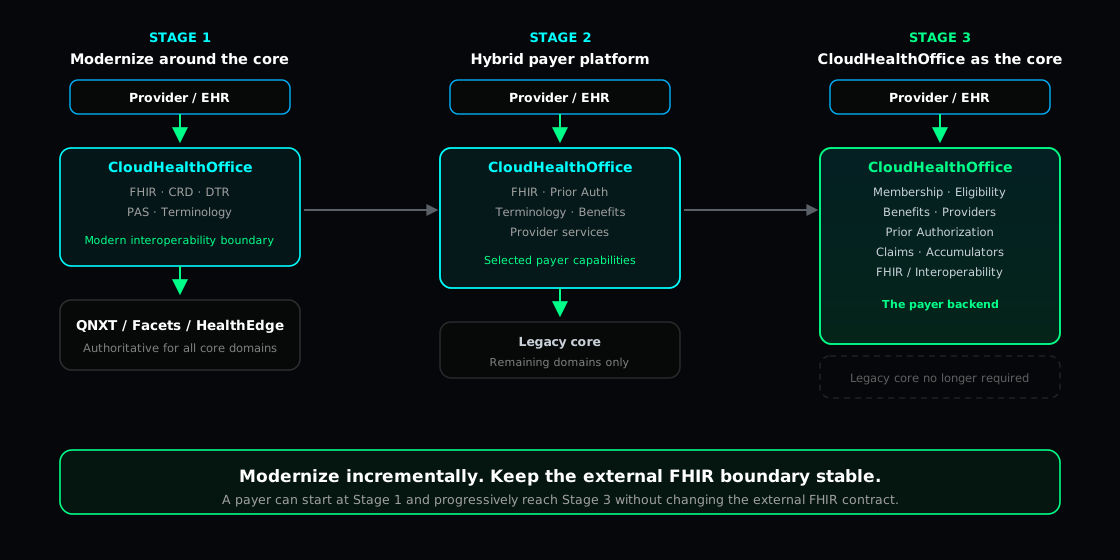
A payer can start with Model 1 and progressively reach Model 3 without changing the external FHIR contract. That is the core positioning point: modernization becomes an internal decision about systems of record, not a renegotiation of the interface providers and partners depend on.
09What Cloud Health Office does — and what still depends on the payer
To keep expectations accurate: the CRD, DTR, PAS, terminology, provider-verification, and authorization capabilities described here are implemented technical capabilities in the platform—PAS-aligned prior authorization, a CRD capability, a DTR capability, and FHIR-native terminology. They support a CMS-0057-F implementation strategy and put a payer on a path toward CMS-0057-F readiness.
They do not, on their own, constitute compliance. Production payer compliance depends on the payer's configuration, identity infrastructure, source systems, medical policies, data quality, operations, security controls, governance, and legal and compliance review. Cloud Health Office is not "CMS certified," is not "guaranteed compliant," and is not "compliant out of the box." What it offers is a real implementation you can read, run, and extend—and a payer-specific onboarding path to put it into production.