Configure Plan Networks
Connect plan-level network tiers to distinct in-network and out-of-network cost sharing, then verify the tier selected during adjudication.
The plan defines tier identities and cost-sharing behavior. Provider participation determines which tier applies to a claim. Test both sides of that boundary.
Network Model
Provider + plan + network
Tier 1 or Tier 2
Copay / coinsurance
| Tier | Example network ID | Typical cost sharing |
|---|---|---|
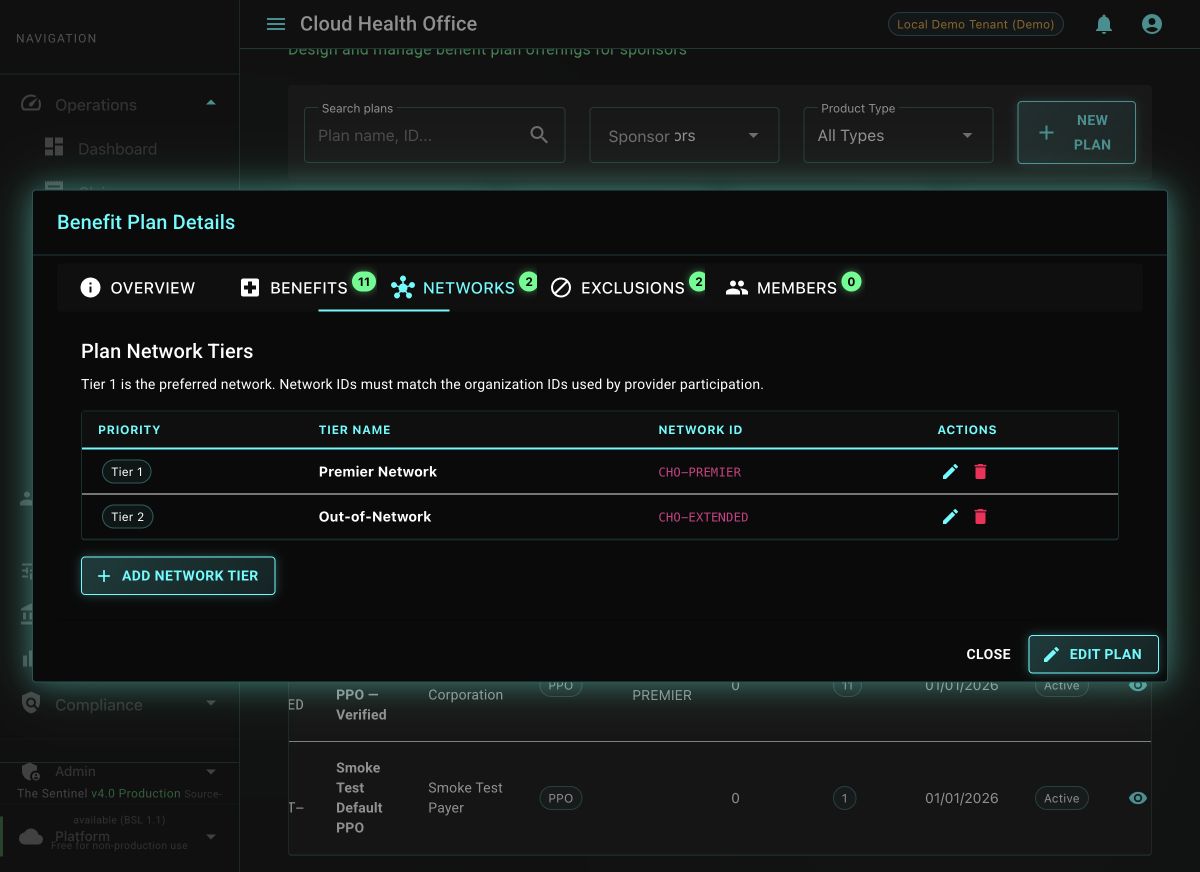
| Tier 1 — In-Network | CHO-PREMIER | Lower copay and coinsurance |
| Tier 2 — Out-of-Network | CHO-EXTENDED | Higher cost sharing and deductible |
1. Configure Network Tiers
Open the plan in the portal and select Networks. The tier table shows the priority, operator-facing name, and stable network organization ID used to resolve provider participation.
Choose Add Network Tier. Set a unique priority beginning with Tier 1, enter a human-readable tier name, and use the same stable organization ID referenced by provider participation. Duplicate tier levels and network IDs are rejected.
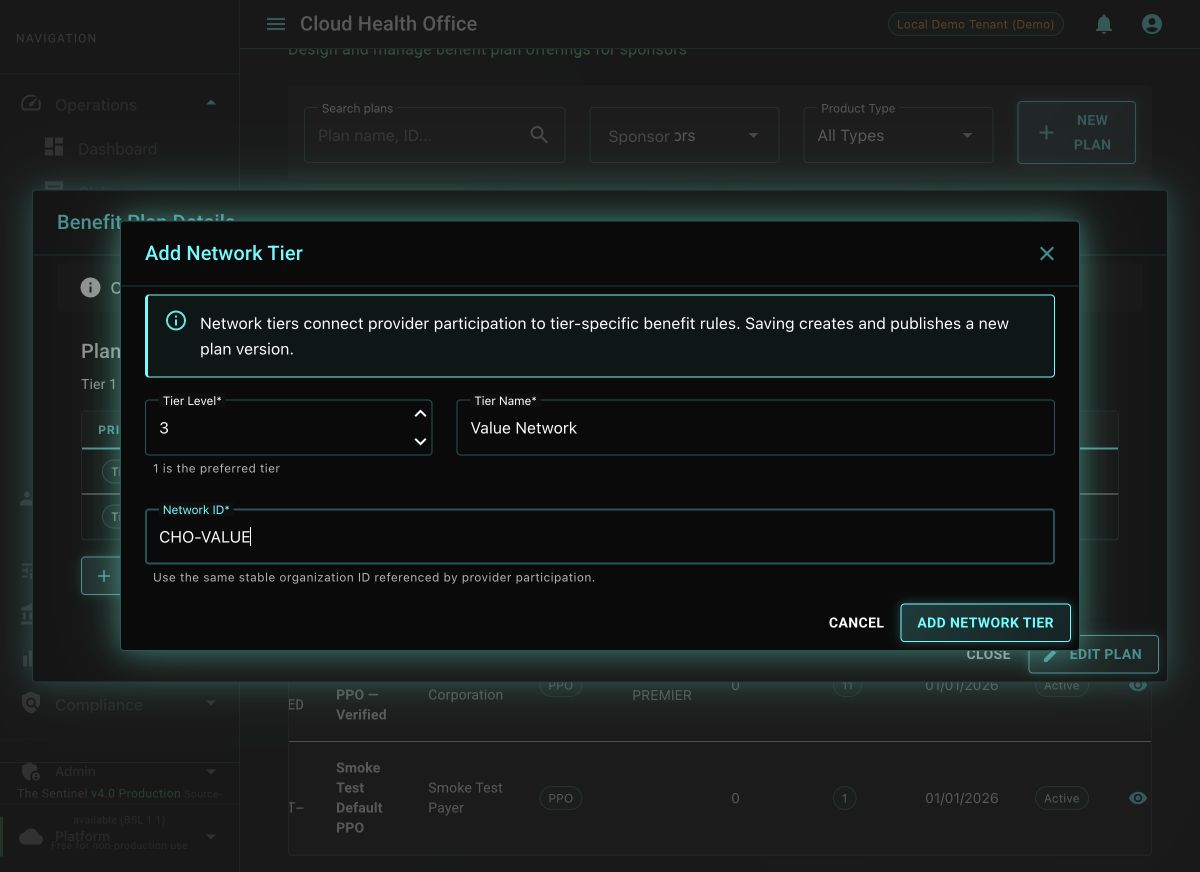
Select Add Network Tier to publish the successor version. Use the pencil action to revise a tier or the delete action to remove it; each operation replaces the complete tier set atomically on one new published version, preserving the prior version for audit.
Optional: automate the complete tier set through the API
For repeatable environment setup, send the complete desired collection. This endpoint uses the same amendment-and-publish behavior as the portal.
curl -fsS -X PUT \
  "${BENEFIT_PLAN_URL}/api/v1/plans/${PLAN_ID}/network-tiers" \
  -H "Content-Type: application/json" \
  -H "X-Tenant-ID: ${TENANT_ID}" \
  -d '[
    {
      "tierName": "Premier Network",
      "tierLevel": 1,
      "networkId": "CHO-PREMIER"
    },
    {
      "tierName": "Out-of-Network",
      "tierLevel": 2,
      "networkId": "CHO-EXTENDED"
    }
]' | jqThe API body is the complete desired tier set. Omitting an existing tier removes it from the successor version; retrieve and review the current plan before automating an update.
2. Configure Tiered Cost Sharing
Each covered-service rule can carry both in-network and out-of-network values:
{
  "benefitType": "medical",
  "serviceCategory": "98",
  "description": "Professional Office Visit",
  "inNetworkCopay": 30.00,
  "outNetworkCopay": 60.00,
  "deductibleApplies": false,
  "oopApplies": true,
  "priorAuthRequired": false
}
For deductible-based services, configure the plan’s in-network and out-of-network deductible and OOP maximum fields as well as the service-level coinsurance.
3. Verify Both Paths
- Retrieve the member view and confirm that the category exposes the expected In-Network and Out-of-Network values.
- Submit a synthetic claim for a provider participating in
CHO-PREMIER. - Confirm the adjudication request records the in-network tier and applies the lower cost sharing.
- Repeat with a synthetic nonparticipating provider and confirm the out-of-network rule.
- Test an emergency scenario separately; emergency and surprise-billing protections can override ordinary network treatment.
curl -fsS \
  -H "X-Tenant-ID: ${TENANT_ID}" \
  "${BENEFIT_PLAN_URL}/api/v1/benefit-plans/${PLAN_ID}/member-view?serviceDate=2026-07-15" |
  jq '.categories[] |
      select(.serviceCategory == "98") |
{displayName,inNetwork,outOfNetwork}'The member view exposes both tiers, provider participation selects the expected tier, and two otherwise equivalent synthetic claims produce the configured in-network and out-of-network responsibility.
Evaluator Review Questions
- Can the reviewer trace a provider’s participation record to the plan network ID?
- Are network-tier fields present for every service category that permits out-of-network care?
- Do accumulator buckets align with network-specific deductible and OOP values?
- Are emergency and regulatory exceptions covered by explicit test cases?