Deployment Guide
Two deployment paths: managed SaaS or self-hosted on your own Kubernetes cluster with full infrastructure control. Both paths are designed for HIPAA-oriented infrastructure, security review, and controlled rollout.
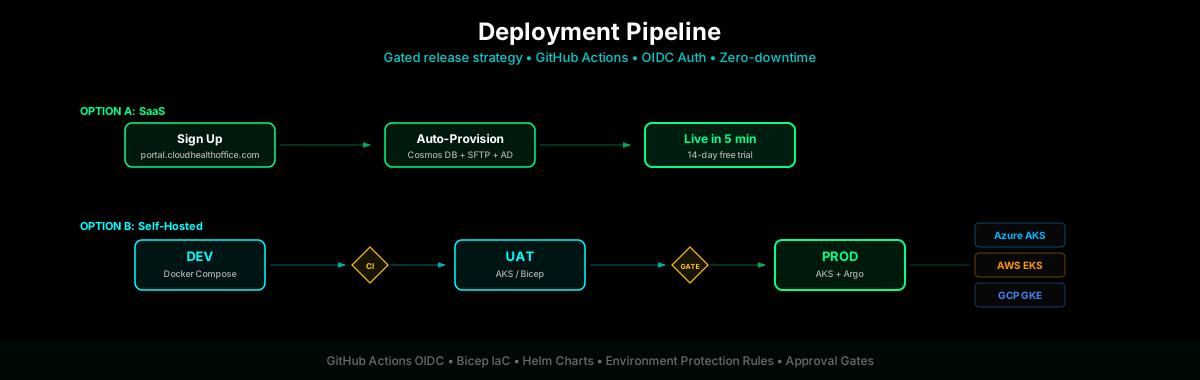
Option A: SaaS (Recommended)
The fastest path to production. Contact Sales to request a pilot deployment — your tenant is provisioned with Cosmos DB, SFTP credentials, Azure AD, and full onboarding support.
Request access and start onboarding
# Contact Sales to initiate pilot provisioning
# https://cloudhealthoffice.com/contact

# Select tier: Starter | Professional | Enterprise (contact sales for pricing)
# Tenant is provisioned and welcome email with credentials is sent within 1 business day
What gets auto-provisioned: Cosmos DB tenant partition, SFTP credentials for clearinghouse integration, Azure AD application, and welcome email with credentials.
Option B: Self-Hosted
For customers requiring on-premise or own-subscription deployment with full infrastructure ownership.
Prerequisites
| Tool | Minimum Version |
|---|---|
Azure CLI | 2.77.0+ |
Bicep CLI | 0.37.0+ |
kubectl | 1.28+ |
Helm | 3.14+ |
Docker | 24+ |
Node.js | 18+ |
# Verify all tools
az --version
az bicep version
kubectl version --client
helm version
docker --version
node --version
Local Development
Start with local Kubernetes for development and testing. This runs MongoDB, Redis, the portal, FHIR, claims, payment, enrollment, provider, and supporting services in the same namespace and service-DNS shape used by production. See the Quick Start for a complete walkthrough.
# Start local Kubernetes platform
bash ./scripts/deploy-local.sh

# Verify health
kubectl get deployments -n cloudhealthoffice
CI/CD Pipeline
The deployment pipeline uses GitHub Actions with OIDC authentication (no stored secrets) and environment protection rules for approval gates between stages.
Pipeline Stages
| Stage | Trigger | What Happens |
|---|---|---|
| CI | Push to main | Build, automated test suite, security scan, Docker image build |
| DEV | CI pass | Auto-deploy to DEV AKS, run E2E tests |
| UAT | DEV pass + approval | Deploy to UAT, run integration tests, security validation |
| PROD | UAT pass + approval | Blue-green deploy to PROD AKS, smoke tests, rollback-ready |
GitHub Actions Setup
# Configure OIDC federated credentials (no stored secrets)
az ad app federated-credential create \
  --id {app-id} \
  --parameters '{
    "name": "github-actions-main",
    "issuer": "https://token.actions.githubusercontent.com",
    "subject": "repo:aurelianware/cloudhealthoffice:ref:refs/heads/main",
    "audiences": ["api://AzureADTokenExchange"]
  }'
Production Deployment
Infrastructure (Bicep)
All Azure infrastructure is defined in Bicep templates under infrastructure/azure/. A single deployment command provisions the complete environment:
# Deploy infrastructure
az deployment sub create \
  --location eastus2 \
  --template-file infrastructure/azure/main.bicep \
  --parameters environment=prod tenantId={tenant}
Kubernetes (Helm)
Deploy all services to AKS (or EKS/GKE) using the Helm chart:
# Add Helm repos
helm repo add argo https://argoproj.github.io/argo-helm

# Deploy Cloud Health Office
helm install cloudhealthoffice ./infrastructure/helm/cloudhealthoffice \
  --namespace cloudhealthoffice \
  --create-namespace \
  --values infrastructure/helm/values-prod.yaml
Secret Management
Production secrets are stored in Azure Key Vault (Premium SKU with HSM-backed keys). Secrets flow to services through two mechanisms — a CI/CD bridge for immediate adoption, and CSI direct mount for zero-secrets-in-Kubernetes.
Architecture
| Phase | Flow | Secrets in K8s? | When to Use |
|---|---|---|---|
| A: CI/CD Bridge | Key Vault → GitHub Actions → K8s Secrets → Pod env vars | Yes (etcd) | Initial migration, simpler setup |
| B: CSI Direct | Key Vault → CSI Driver → Pod volume mount (future: file-based provider) | No | Planned — requires file-based ISecretProvider implementation |
Setup (Phase A — CI/CD Bridge)
# 1. Provision Key Vault with RBAC, purge protection, and AKS network rules
./scripts/setup-azure-keyvault.sh \
  --resource-group rg-cloudhealthoffice-prod \
  --vault-name cho-app-kv \
  --aks-cluster cho-aks \
  --location eastus \
  --log-analytics cho-logs

# 2. Populate secrets from manifest
cp scripts/secrets-manifest.example.env scripts/secrets-manifest.env
# Edit with real values — NEVER commit this file
./scripts/populate-keyvault-secrets.sh --vault-name cho-app-kv --file scripts/secrets-manifest.env

# 3. Enable in GitHub Actions (workflow falls back to GitHub Secrets if unset)
gh variable set KEY_VAULT_NAME -b 'cho-app-kv'

# 4. Validate access
./scripts/validate-keyvault-access.sh --vault-name cho-app-kv --verbose
Setup (Phase B — CSI Direct Mount)
# 1. Install CSI driver add-on
az aks enable-addons --addons azure-keyvault-secrets-provider \
  --name cho-aks --resource-group rg-cloudhealthoffice-prod

# 2. Enable OIDC issuer and Workload Identity
az aks update --name cho-aks --resource-group rg-cloudhealthoffice-prod \
  --enable-oidc-issuer --enable-workload-identity

# 3. Per-service: create managed identity, federated credential, and RBAC
# See docs/AZURE-KEYVAULT-INSTALLATION.md for the full 30-service checklist
Service Inventory
Each service requires its own Managed Identity for per-service RBAC scoping to Key Vault.
| Category | Count | Secret Source |
|---|---|---|
| .NET Microservices | 29 | ISecretProvider (Phase B) or K8s Secret env vars (Phase A) |
| Blazor Portal | 1 | ISecretProvider (Phase B) or K8s Secret env vars (Phase A) |
| Non-.NET Containers | 8 | K8s Secret env vars only (Phase A — no code changes needed) |
Secret Naming Convention
Key Vault does not allow : in secret names. Use -- (double-dash) as the hierarchy delimiter. The ISecretProvider configuration layer maps -- → : automatically.
| Key Vault Name | .NET Configuration Key |
|---|---|
CosmosDb--ConnectionString | CosmosDb:ConnectionString |
Stripe--SecretKey | Stripe:SecretKey |
AzureAd--ClientSecret | AzureAd:ClientSecret |
Key Vault Security Configuration
| Setting | Value | Rationale |
|---|---|---|
| SKU | Premium | HSM-backed keys for HIPAA |
| RBAC Authorization | Enabled | Per-identity scoping (not vault-level access policies) |
| Purge Protection | Enabled | Cannot be disabled once enabled — prevents accidental deletion |
| Soft Delete | 90 days | Recovery window for accidental deletions |
| Network Default | Deny | Only AKS subnet and Azure trusted services allowed |
| Diagnostics | AuditEvent → Log Analytics | 365-day retention for HIPAA audit trail |
| Rotation Policy | 90 days | Automated expiration alerts via rotate-keyvault-secrets.sh |
Rotation & Alerting
# Check for secrets expiring within 14 days
./scripts/rotate-keyvault-secrets.sh --vault-name cho-app-kv --days 14

# JSON output for CI/CD alerting (scheduled GitHub Action)
./scripts/rotate-keyvault-secrets.sh --vault-name cho-app-kv --days 30 --format jsonFor the complete per-service Workload Identity checklist with step-by-step commands for all 30 services, see AZURE-KEYVAULT-INSTALLATION.md on GitHub.
Post-Deployment Verification
# Health check all services
kubectl get pods -n cloudhealthoffice
kubectl exec -it deploy/claims-service -n cloudhealthoffice -- curl -s localhost:5001/health

# Run E2E test suite
npm run test:e2e -- --environment=prod

# Verify FHIR endpoints
curl https://api.your-domain.example/fhir/r4/metadata | jq .statusFor the complete 3,000+ line deployment guide including secrets management, rollback procedures, and troubleshooting, see DEPLOYMENT.md on GitHub.
Complete the Production Readiness Checklist, run an isolated restore using the Backup & Disaster Recovery Runbook, and test paging with the Observability & Incident Response Runbook before routing production traffic.