First Claim Evaluator Journey
Follow one synthetic professional claim from plan configuration and active coverage through provider-network resolution, raw X12 837 intake, adjudication, and operator evidence.
Can the platform explain why this member, provider, service, plan, and network produced this exact claim outcome? This journey proves each dependency before treating the final status as meaningful.
The guided synthetic-claim action is enabled only in Development, Local Demo, or an explicitly approved demo environment. It creates generated records and must not be enabled casually in production. Never use PHI in screenshots.
The Five-Gate Proof Chain
| Gate | Evidence to record | Failure means |
|---|---|---|
| Plan readiness | Published version, effective date, benefits, networks, member view | Do not submit yet; configuration is incomplete. |
| Member coverage | Active coverage, exact plan ID, effective period | The claim cannot resolve the intended benefit plan. |
| Provider participation | Active network membership on the service date | The claim may select another tier, pend, or deny. |
| 837 intake | Accepted transaction, claim number, persisted claim ID | Diagnose EDI or intake before adjudication. |
| Adjudication | Terminal status, financials, outcome reason, pipeline stages | Explain the business result from recorded evidence. |
1. Prove the Plan Is Ready
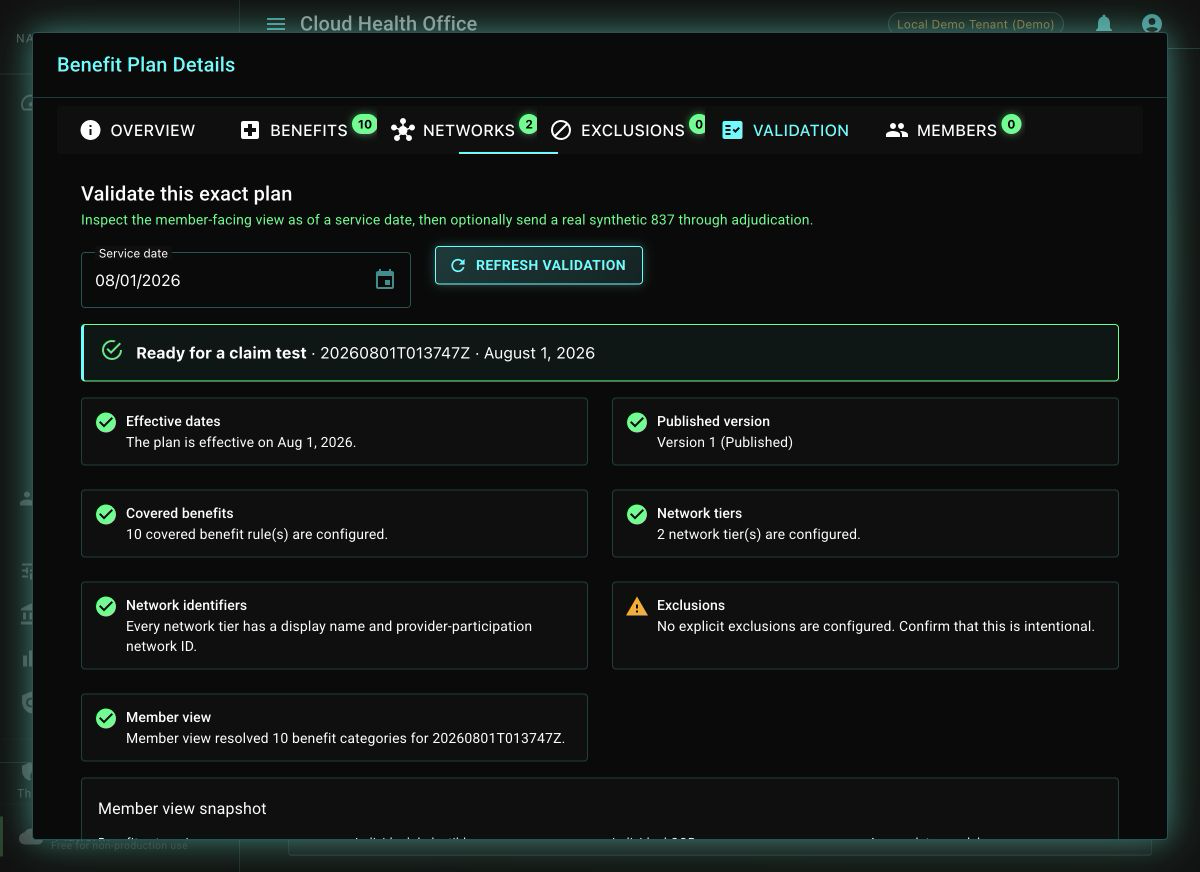
Open Configuration → Benefit Plans, select the published test plan, and open Validation. Choose the claim service date and refresh the checks. Continue only when the effective-date, publication, covered-benefit, network-tier, and member-view checks are explainable.
2. Prove Member Eligibility Selects the Plan
The synthetic workflow creates an isolated member and active coverage whose PlanId is the stable identifier of the selected plan. Use Open member coverage from the result to inspect that record directly.
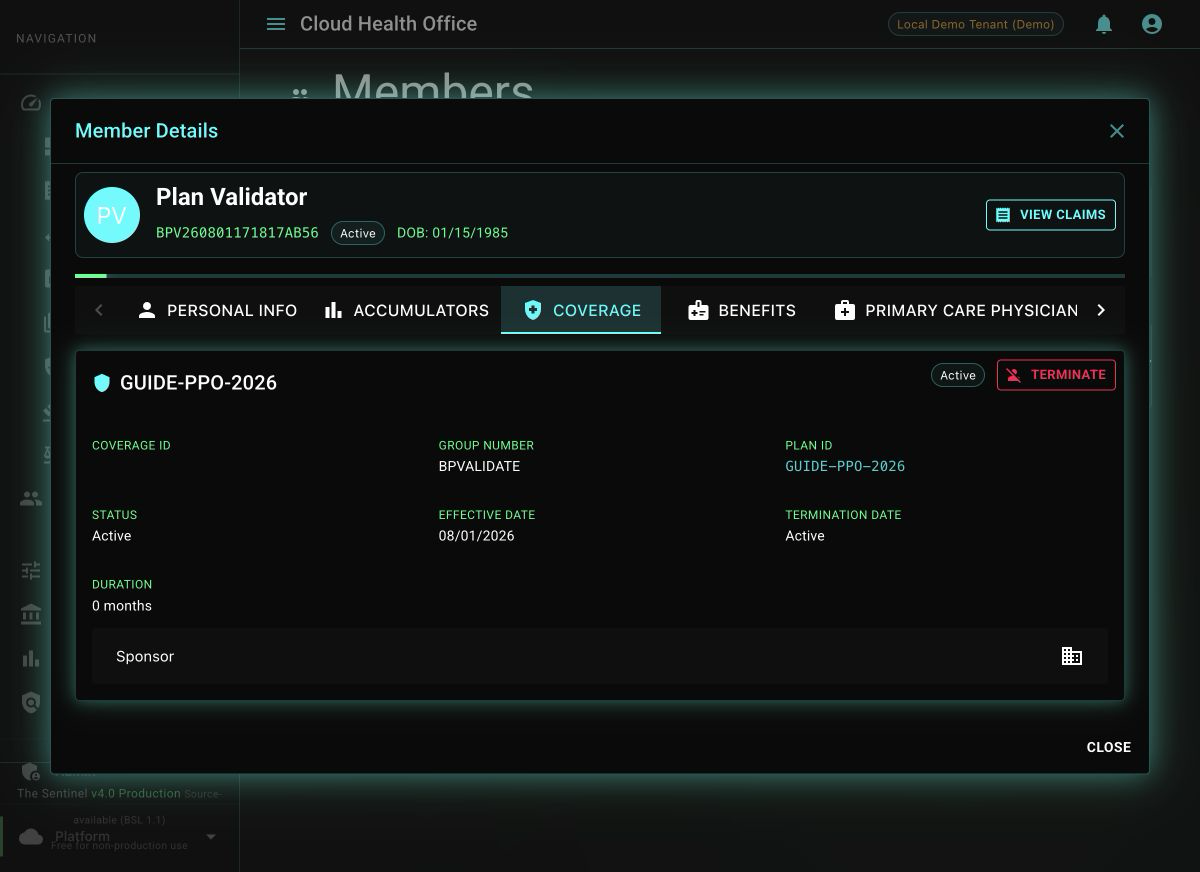
For a real integration, this same dependency normally arrives through an 834 enrollment transaction or coverage API. The synthetic action makes the evaluator fixture repeatable without bypassing the ordinary coverage read used by claims.
3. Prove Provider Participation Selects the Tier
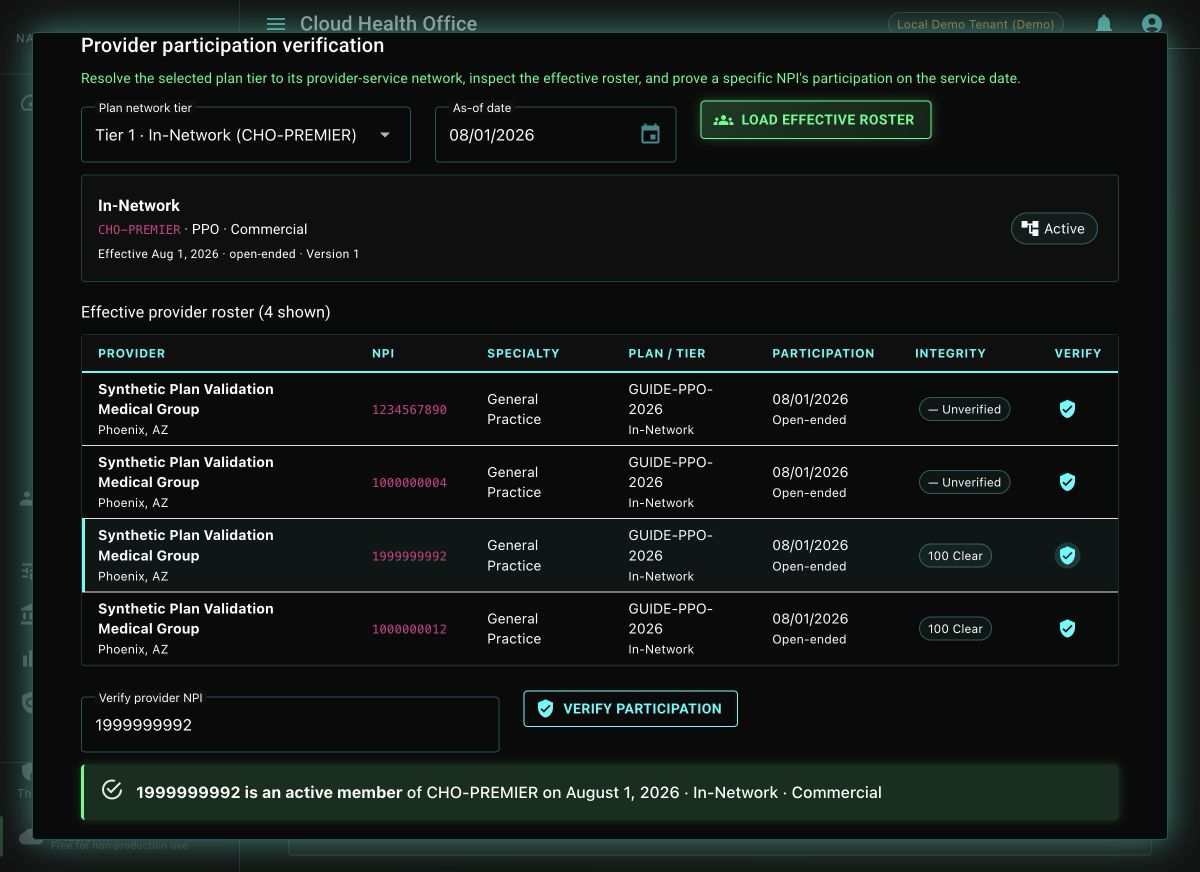
Return to the plan’s Networks tab. Resolve the preferred tier to provider-service, load its effective roster, and verify the test NPI on the same service date. The membership check uses the same date-sensitive endpoint consulted by the claims network-and-credentialing stage.
4. Send an Actual X12 837P
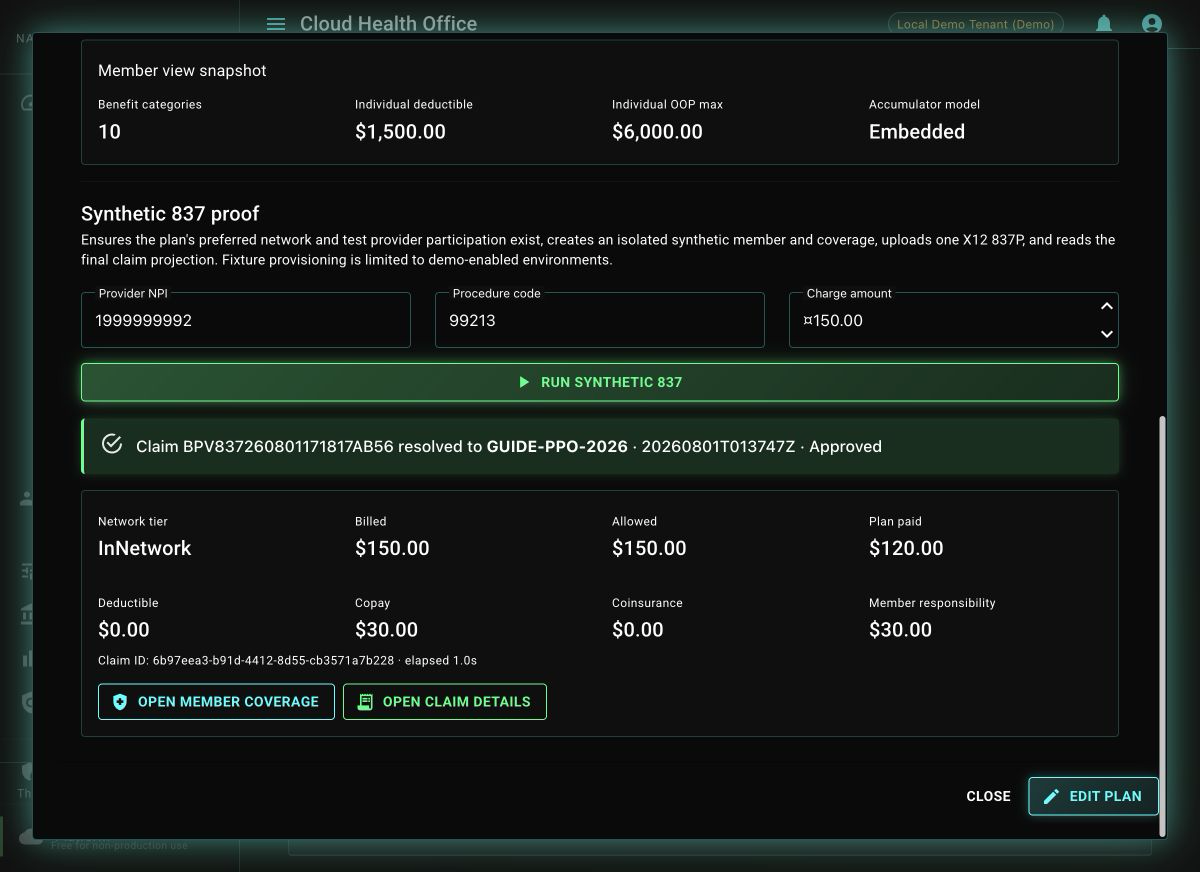
In Validation → Synthetic 837 proof, confirm the generated provider NPI, procedure code, and charge, then select Run synthetic 837. The portal uploads an actual X12 837P and waits for the normal asynchronous claim projection; it does not call a benefit calculator shortcut.
| Result field | What it proves |
|---|---|
| Resolved plan and version | Coverage selected the intended published configuration. |
| Network tier | Provider participation mapped to the expected cost-sharing tier. |
| Allowed and plan paid | Pricing and payer liability completed. |
| Deductible, copay, coinsurance | The configured benefits drove member responsibility. |
| Claim ID and elapsed time | The result is persisted and can be followed into operations. |
5. Read the Persisted Claim and Pipeline
Select Open claim details, then open Adjudication Pipeline. Confirm that intake, eligibility and plan resolution, provider gates, benefit calculation, disposition, and persistence agree with the summary. An Approved, Denied, or Pended status is credible only when the recorded stages and reason explain it.
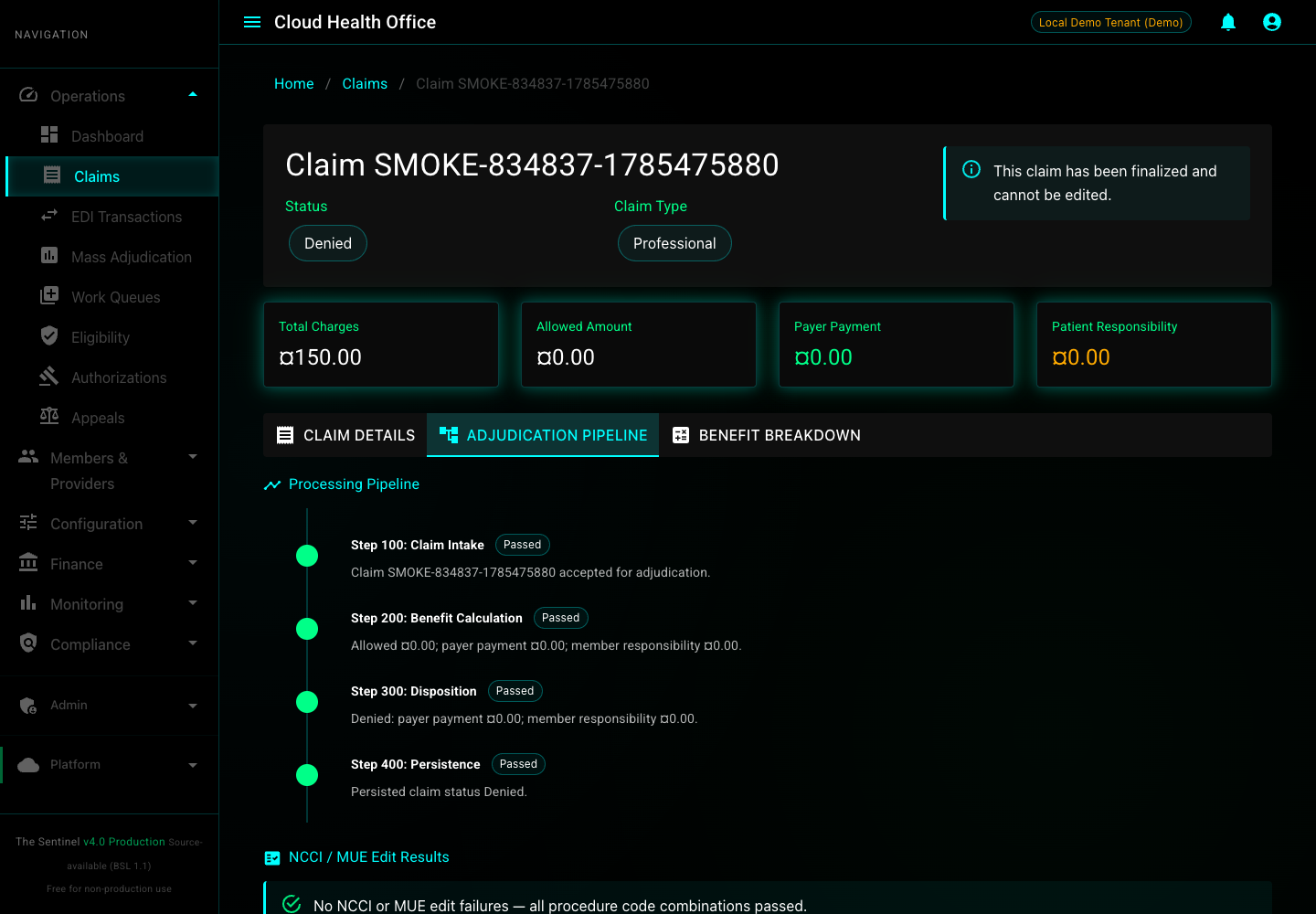
You can identify the exact plan version, active member coverage, provider-network relationship, accepted 837, persisted claim, financial result, and the stages that produced its disposition.
Refresh the Playwright Evidence
The checked-in capture workflow runs the same synthetic journey and replaces its three evaluator screenshots at a fixed desktop viewport.
npm install
GUIDE_PLAN_ID=GUIDE-PPO-2026 npm run guides:capture:first-claim
Use only generated data. The broader 837 tutorial covers the 834-to-837 shell workflow, while the operations runbook covers queues, consumers, retries, dead letters, and recovery.