Submit an 837 and Follow the Claim
Send a real synthetic X12 837 through the local Kubernetes services, wait for asynchronous adjudication, and examine the resulting claim in the portal.
This walkthrough uses generated member, provider, and claim data. Never place PHI, credentials, customer identifiers, or private environment URLs in documentation screenshots.
What You Will Do
The repository’s end-to-end smoke workflow creates the minimum benefit-plan context, imports an 834 enrollment transaction, submits an actual 837 professional claim, and polls the claims API until adjudication reaches a terminal state.
- Create a synthetic benefit plan and external plan-code mapping.
- Import a synthetic 834 member enrollment.
- Submit one X12 837P claim to the claims API.
- Let the local services process the claim asynchronously.
- Open the saved claim and its adjudication trace in the portal.
Prerequisites
- A running local Cloud Health Office Kubernetes deployment
kubectl,curl, andjq- Local port-forwards for benefit plans, enrollment import, claims, and the portal
- Development-only local demo authentication enabled for the portal
Local demo sign-in is intended only for local development and guided demonstrations. Production environments must use normal identity-provider authentication and the appropriate Claims Examiner authorization.
1. Submit the 837 Workflow
From the repository root, run the smoke workflow with a dedicated synthetic tenant:
TENANT_ID=guide-837 \
BENEFIT_PLAN_URL=http://localhost:5002 \
ENROLLMENT_IMPORT_URL=http://localhost:5011 \
CLAIMS_URL=http://localhost:5001 \
scripts/smoke/834-to-837-e2e-smoke.sh
The final output includes the claim ID, claim number, resolved benefit plan, terminal status, and financial totals. Keep the claim ID; it is the stable identifier used by the portal route and screenshot workflow.
The 834 member was accepted, the 837 claim was persisted, a benefit plan was resolved, and the claim reached a terminal adjudication state. The exact Approved, Denied, or Pended result depends on the rules and reference data loaded in your environment.
2. Inspect the Claim in the Portal
Sign in through the Development-only local demo endpoint, then open /claims/{claimId}. The overview connects the original transaction to the persisted claim: claim number, disposition, claim type, member, billing provider, service dates, charges, allowed amount, payer payment, and member responsibility.
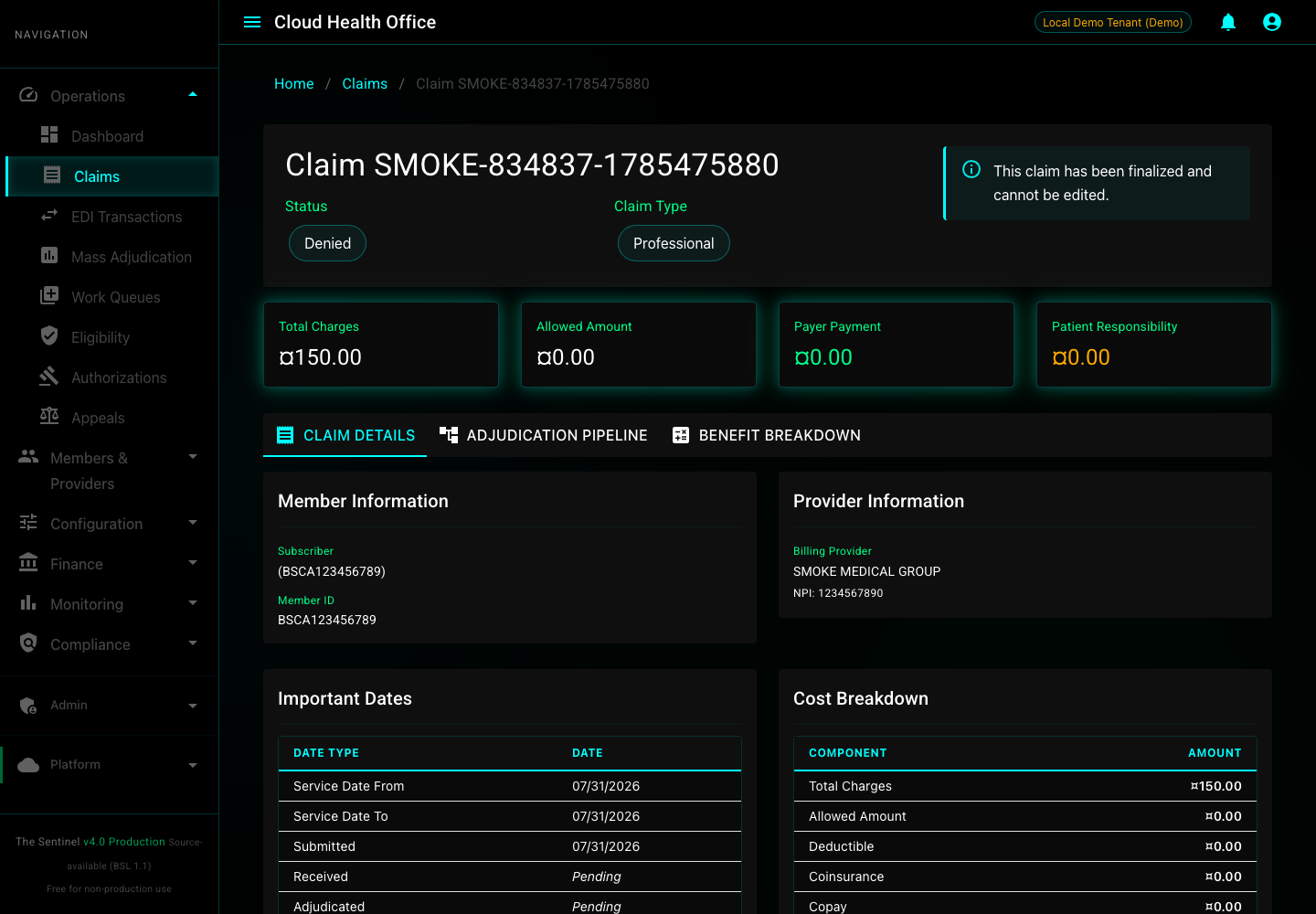
A denied claim can still represent a healthy pipeline run. In this example the transaction was accepted and processed, but the configured adjudication rules produced a denied disposition with no allowed or paid amount.
3. Read the Adjudication Pipeline
Select Adjudication Pipeline to see how the claim moved through intake, benefit calculation, disposition, and persistence. This is the fastest way to distinguish an ingestion failure from an expected business-rule outcome.
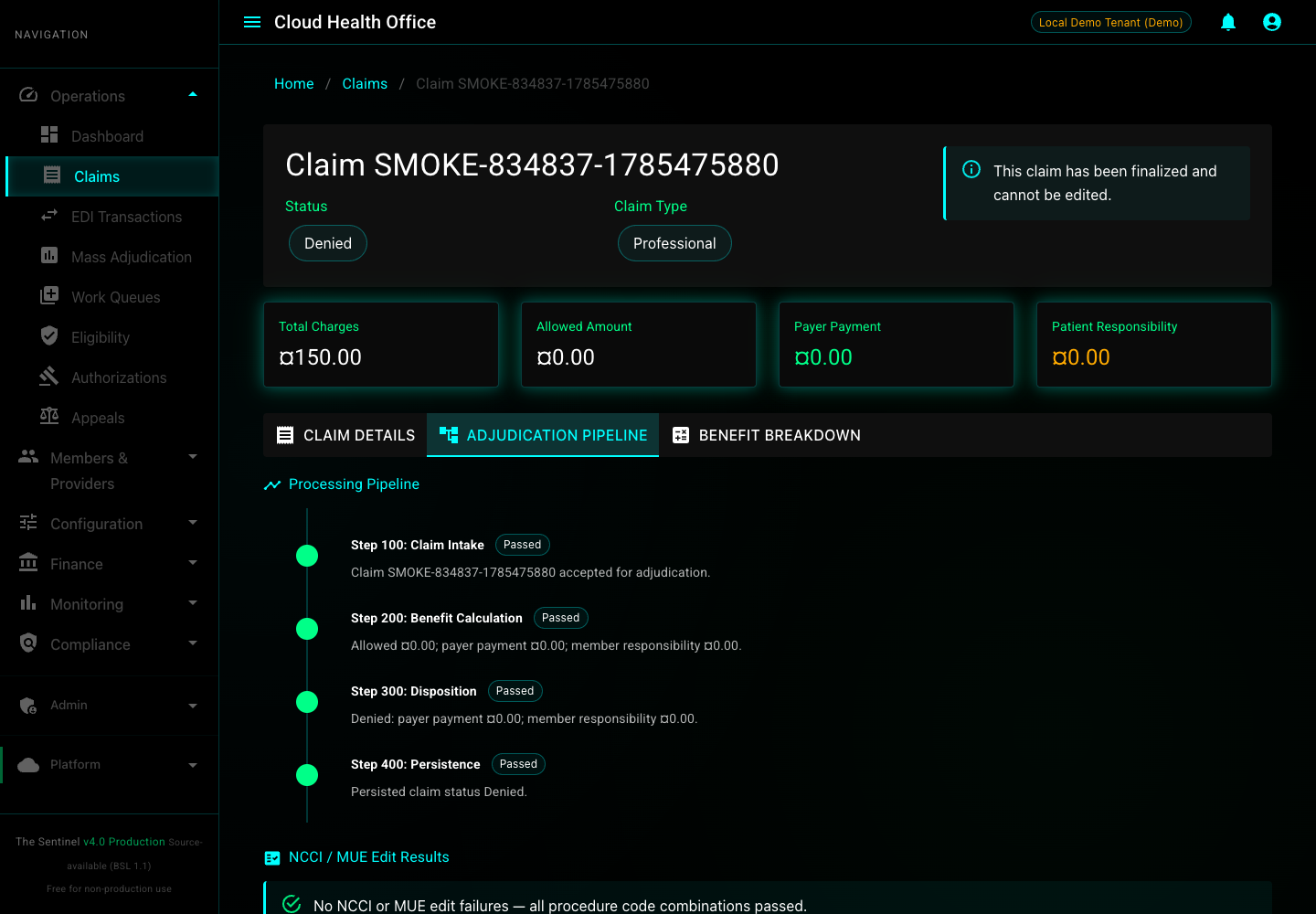
Also review the NCCI/MUE section beneath the timeline. It shows whether procedure-code combinations or unit limits contributed to the result.
Refresh the Guide Screenshots with Playwright
The screenshots above are generated by a checked-in Playwright workflow, so the guide can be refreshed after intentional portal changes instead of accumulating stale hand-captured images.
npm install
GUIDE_CLAIM_ID=<synthetic-claim-id> npm run guides:capture:837
The command launches local Chrome headlessly at a fixed viewport, signs in through the local demo endpoint, and replaces the two images under src/site/graphics/user-guides/submit-837/.
Troubleshooting
| Symptom | What to check |
|---|---|
| Member or plan setup fails | Confirm the benefit-plan and enrollment-import port-forwards and use a fresh synthetic tenant ID. |
| Claim stays Submitted | Check claims-service and adjudication-service logs, then verify the configured message transport and consumers. |
| BenefitPlanId is empty | Confirm the external plan-code mapping and the member’s active coverage dates. |
| Portal cannot load the claim | Confirm the portal tenant matches TENANT_ID, the claims-service URL is reachable, and the claim ID came from the same run. |
| Playwright cannot connect | Confirm Chrome is installed, the portal is listening at GUIDE_PORTAL_URL, and local demo authentication is enabled. |